| |
- Select the destination of the job done notice → press [OK].
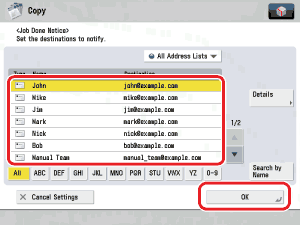
If you select a destination that is stored with an access number, press [Access Number] and then enter the access number using  - -  (numeric keys). If you press [No Access Number], the destinations that are not managed with an access number are displayed. (numeric keys). If you press [No Access Number], the destinations that are not managed with an access number are displayed.
- For instructions on selecting a destination, see "Scan and Send."
- You cannot select multiple destinations at one time.
- Once copying is complete, a job done notice is sent to the selected destination.
- To display the [Access Number] key, set [Manage Address Book Access Numbers] to 'On'. To access the Access Number Management setting, press
 (Settings/Registration) → [Set Destination] → [Manage Address Book Access Numbers]. (See "Scan and Send.") (Settings/Registration) → [Set Destination] → [Manage Address Book Access Numbers]. (See "Scan and Send.")
|







