Copy > Changing the Copy (Zoom) Ratio > Setting the X and Y Axes Independently
*
Setting the X and Y Axes Independently

Return to Overview


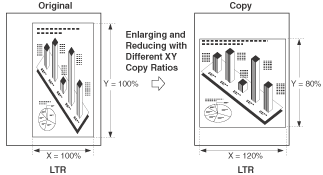
The Set XY Ratio mode enables you to make reduced or enlarged copies with different XY copy ratios expressed in percentages. Any copy (zoom) ratio from 25% to 400% can be set.

The following two Set XY Ratio modes are available.


Remark
  • To cancel this setting, press [Copy Ratio] → [Set XY Ratio] → [Stop].

  • Manually Specifying the Copy/Zoom Ratio (Set XY Ratio)

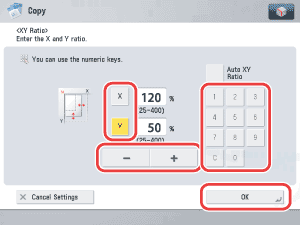
You can manually set different copy (zoom) ratios for the horizontal (X) and vertical (Y) axes, expressed in percentages and in 1% increments.


Remark
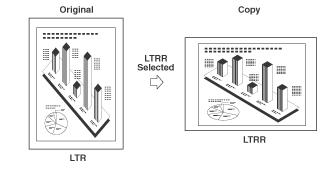
  • If you set the copy (zoom) ratio with the Set XY Ratio mode, the image of the original may be rotated before being printed on the paper depending on the outcome of the computation executed by the machine using the original size and the specified copy (zoom) ratio.

  • Automatically Specifying the Copy Ratio (Auto XY Zoom)

The XY copy ratio is automatically set to suit the size of the selected paper.


Remark
  • You cannot copy highly transparent originals, such as transparencies, in the Auto XY Zoom mode. Manually specify the copy (zoom) ratio for these types of originals.
  • If you set the Auto XY Zoom mode, select the paper size using the Manual Paper Selection mode. If you do not select a paper size, Paper Drawer 1 is automatically selected and the copy ratio is set to match the size of the paper loaded in that drawer.
  • If you set the copy ratio in the Auto XY Zoom mode, Auto Orientation is not performed.
  • If you notice a difference between the automatic copy ratio and the actual copy size, you can try to eliminate this error by adjusting the setting in [Fine Adjust Zoom]. (See "Fine Adjust Zoom.")

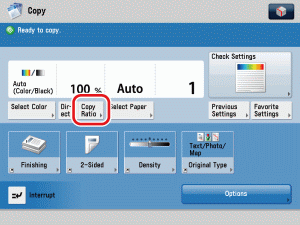
  1. Place your originals → press [Copy Ratio].

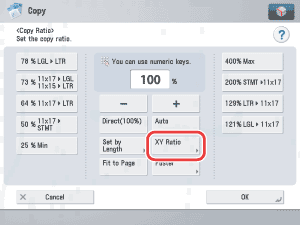
  1. Press [XY Ratio].

  1. Specify the desired copy ratios.
  • To manually specify the copy ratios (Set XY Ratio):
  • To have the copy ratios automatically specified (Auto XY Zoom):

  • To manually specify the copy ratios (Set XY Ratio):
  • Press [X] (horizontal axis) → enter a value.
  • Press [Y] (vertical axis) → enter a value.
  • Press [OK].


  • To have the copy ratios automatically specified (Auto XY Zoom):
  • Press [Set XY Ratio] → [OK].
  • If you set [Set XY Ratio], you have to select a paper size manually. If you do not specify a paper size, the copy ratio is set to match the size of the paper loaded in paper drawer 1.

  1. Press (Start).

  • Back To Top