Copy > Changing the Copy (Zoom) Ratio > Preset Zoom
*
Preset Zoom

Return to Overview


The machine offers you a variety of preset copy (zoom) ratios to reduce or enlarge standard size originals to another standard paper size.


Remark
  • Place the originals horizontally in the following cases:
  • If you are enlarging LTR originals to 11" × 17"
  • If you are enlarging STMT originals to 11" × 17" (when the original is placed on the platen glass)
  • If you are reducing 11" × 17" originals to LTR with [Auto Orientation] in [Function Settings] (Settings/Registration) set to 'Off', load LTRR paper in a paper drawer or the multi-purpose tray.
  • Placing an original horizontally means setting the original with the longer side sideways. (See "Basic Operations.")

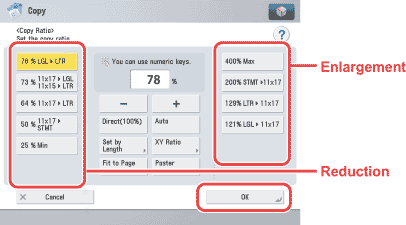
  • Reduction

The available preset copy (zoom) ratios for reducing originals are:

  • LGL → LTR (78%)
  • 11" × 17" → LGL, 11" × 15" → LTR (73%)
  • 11" × 17" → LTR (64%)
  • 11" × 17" → STMT (50%)
  • Minimum (25%)
  • Enlargement

The available preset copy (zoom) ratios for enlarging originals are:

  • Maximum (400%)
  • STMT → 11" × 17" (200%)
  • LTR → 11" × 17" (129%)
  • LGL → 11" × 17" (121%)

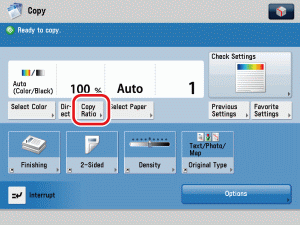
  1. Place your originals → press [Copy Ratio].

  • The Paper Select setting must be set to 'Auto'.
  1. Select the desired copy ratio → press [OK].

  1. Press (Start).

  • Back To Top