Copy > Canceling a Copy Job > Using the Stop Key

*
Using the Stop Key

Return to Overview


  1. Press (Stop).

When canceling a job that which is being printed, press [Stop] on the pop-up screen that appears during printing.

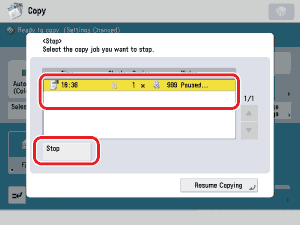
  1. Select the copy job that you want to cancel → press [Stop].

The copy job is canceled.

  • You cannot select multiple jobs and cancel them all at once. Select and cancel one job at a time.
  1. Press [Resume Copying].

Copying resumes.

  • When you press (Stop) while copying in the Store in Mail Box mode and if the Store in Mail Box (Copy upon Storing) mode is not set, the job is not paused, but canceled.

  • Back To Top